Solo
For one project manager and a small team getting organized with AI.
$12/seat/mo
Start your 30-day free trial
For PMs and growing teams
Bring project plans, tasks, risks, and reporting together in one place. Use AI to simplify status updates, improve visibility, and spend more time delivering results.
Start with essential project management and budgeting, then scale to resource planning, advanced budgeting, and portfolio-wide visibility as your work grows.
Watch the 1-minute tour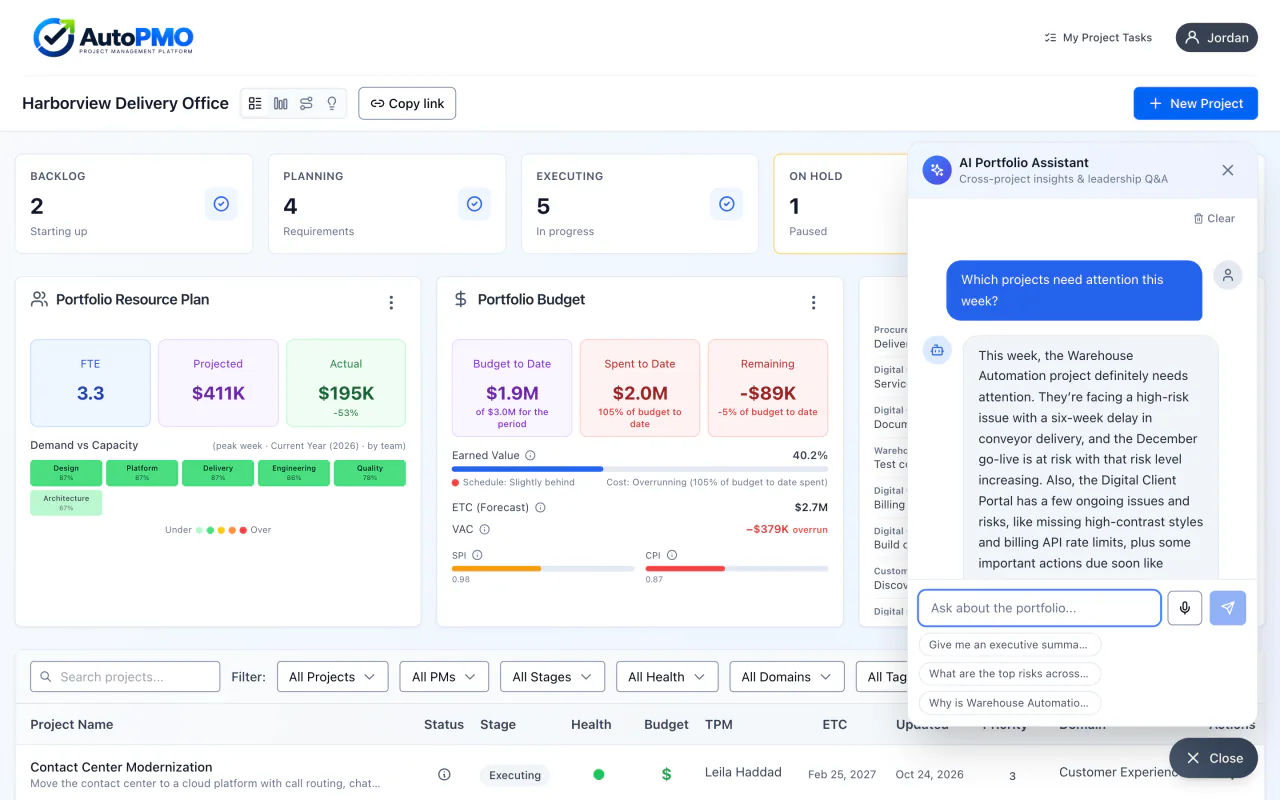
Project management software
Ready on day one
Charters, timelines, RAID logs, status reports, and budgets are built in. No templates to build, no sheets to wire together.
AI Project Assistant
AI that knows your project
Ask questions, surface risks, and draft status updates from your project's own charter, tasks, and documents.
Grow with your team
Visibility across projects
Add resource planning, a portfolio budget rollup, roadmaps, and an AI Portfolio Assistant that answers questions across every project.
A sample project: uploaded documents, then its charter, user stories, resource plan, AI assistant, timeline, daily updates, and weekly status report.
Every project starts with a conversation. Turn yours into a plan with AutoPMO.
Upload meeting transcripts, requirements, and documents to your project's document share. AI analyzes that context to help generate your charter, with clear goals and scope. Then turn requirements into stories your team can work from.
Now begin planning the people, effort, and budget behind the project. Ask your AI assistant for guidance as you go. Generate a timeline, review the milestones, and refine the work ahead.
Capture daily updates as your team makes progress. Then generate a weekly status report, bringing accomplishments, risks, budget, and timeline together for review.
From the first idea to delivery, keep your project connected. Start your free trial at autopmo.ai.
AI Project Assistant
It works inside every project and already knows your charter, tasks, RAID log, status notes, and documents. Ask in plain language and get answers about your work, not generic advice.
Ask what's on track, what changed, and what needs attention, and get answers grounded in the project's own data.
Ask about risks, issues, and blockers. When something needs logging, the assistant drafts the risk, action, or decision and you accept it.
Update task and milestone status, health ratings, risks, and decisions from one conversation. Nothing changes until you accept it.
Ask why a milestone slipped or what is putting the plan at risk, and get the answer from the charter, timeline, and RAID log.
The platform
Other tools hand you a blank grid and an assistant. AutoPMO comes with the PMO already built, from a single project to a full portfolio, with AI working inside it.
More about AI project management software
See health, resources, budgets, and milestones across every project in one view.
Assign work, set owners and dates, and track every task's progress in one planning grid.
Turn your project documents into a draft charter, from executive summary to work breakdown, ready for you to edit.
Build phases, work packages, and milestones from the charter for Agile, Waterfall, or Hybrid delivery, then refine them in the task grid and review them on a Gantt timeline you can export to Excel or PDF.
Track risks, actions, issues, and decisions alongside the work they affect, with AI summaries on demand.
More about the RAID logTrack project budgets on every plan, and draft weekly status reports from live project data, ready to export to Word or PDF.
More about status reportingOnboarding
Set up your workspace, add your projects, and put your AI Project Assistant to work on planning and status.
Step 1
Choose your plan, create an account, and set up a workspace for your projects.
Step 2
Add schedules, tasks, milestones, risks, and the people who own them, or let AI draft the charter and timeline for you.
Step 3
Ask questions, log risks, and update status from your project's own data. Nothing the assistant suggests is applied until you accept it.
Security
Workspace-scoped access, role-based permissions, and multi-factor sign-in protect your project data, and the AI never changes anything without your approval. Read the security summary for the full picture.
Plans
Solo — For one project manager and a small team getting organized with AI, 30-day free trial. Pro Teams — For project teams and PMOs managing resources, projects and portfolios, 30-day free trial. Enterprise: For organizations that need AutoPMO integrated with their systems and tailored to how they run projects.
For one project manager and a small team getting organized with AI.
$12/seat/mo
Start your 30-day free trialFor project teams and PMOs managing resources, projects and portfolios.
$19/seat/mo
Start your 30-day free trialFor organizations that need AutoPMO integrated with their systems and tailored to how they run projects.
Contact sales
Contact usCreate your workspace and bring planning, tasks, risks, and status reporting together in one place.